Minimalist Sunlit Wall Frame Mockup
Presenting artwork in a digital environment requires more than just uploading a high-resolution file; it demands context. A piece of art does not exist in a vacuum—it lives in spaces, interacts with light, and evokes emotion through its surroundings. This is where the Minimalist Sunlit Wall Frame Mockup becomes an indispensable tool for designers, artists, and business owners. By simulating a realistic interior setting, this resource allows creators to showcase their work with effortless elegance, bridging the gap between a flat digital file and a tangible, aspirational product.
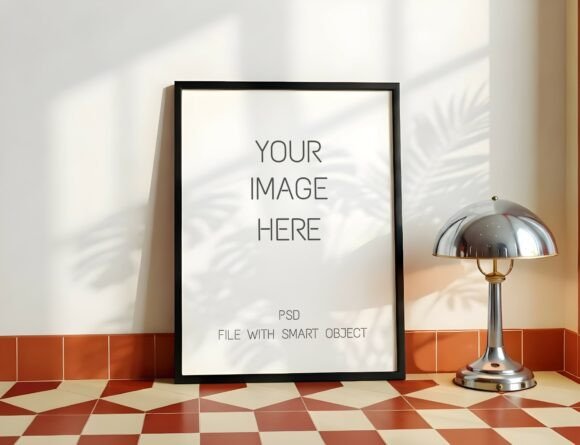
The concept behind this mockup is rooted in simplicity and realism. It features a large vertical wooden frame resting on a light hardwood floor, set against a textured off-white wall. The visual appeal is heightened by dramatic and realistic leaf and window shadows that cast across the scene. These details are not merely decorative; they create a genuine three-dimensional feel that grounds the artwork in a believable space. For anyone looking to sell prints, photography, or typography online, this level of presentation can significantly influence customer perception and trust.
The Power of Context in Digital Presentation
When consumers browse online marketplaces, they rely heavily on visual cues to gauge quality. A standalone image of a poster or canvas often feels sterile and disconnected from reality. In contrast, a mockup that places the design within a curated environment helps the buyer visualize how the piece would look in their own home. The Minimalist Sunlit Wall Frame Mockup leverages this psychological principle by providing a clean, uncluttered backdrop that draws attention to the artwork itself while suggesting a lifestyle of sophistication and calm.
This approach is particularly effective for abstract prints, fine art photography, and modern typography. The neutral tones of the wall and floor ensure that the colors and lines of the artwork remain the focal point. Meanwhile, the natural lighting simulated in the scene adds warmth and depth, making the digital representation feel inviting rather than artificial. For professional designers, this means less time spent explaining the potential of a design and more time letting the design speak for itself.
Key Features and Technical Usability
One of the primary concerns for users adopting new digital assets is the learning curve. Fortunately, this mockup is designed with accessibility and ease of use in mind. The package includes a single PSD file equipped with a Smart Object layer. This feature is the cornerstone of the user experience, allowing for a seamless "drag and drop" editing process. Users can simply double-click the Smart Object layer, paste their design, and save the changes. The mockup automatically adjusts to fit the frame, eliminating the need for complex manual adjustments.
- Smart Object Integration: The core functionality relies on Photoshop’s Smart Objects, ensuring non-destructive editing. This means you can swap out designs repeatedly without losing quality or altering the underlying structure of the mockup.
- Adjustable Lighting: Realism is enhanced by the ability to tweak the lighting. Using the Opacity slider, users can adjust the intensity of the shadows and highlights. This flexibility allows for customization based on the mood of the artwork or the specific aesthetic of the brand being presented.
- Cross-Platform Compatibility: While optimized for Adobe Photoshop, the file is also compatible with Photopea, a free, browser-based alternative. This inclusivity ensures that freelancers and small business owners who do not subscribe to creative software suites can still utilize professional-grade tools.
- Multiple Aspect Ratios: The package includes three 4:5 aspect ratio frames. This versatility accommodates various types of content, from portrait-oriented photography to square-format graphic designs, reducing the need to source multiple different mockups for a single project.
What You Receive and How to Use It
Purchasing this digital asset provides immediate access to a comprehensive toolkit. Beyond the main PSD file, users receive a high-resolution JPG file for quick previews or social media posts, as well as a PDF instruction guide. The guide serves as a practical reference, walking users through the setup process and troubleshooting common issues. Having these resources readily available ensures that even those with limited technical experience can achieve professional results.
However, achieving the best possible outcome requires attention to detail, particularly regarding image proportions. To ensure your artwork looks its best and fits perfectly into the frame, it is crucial to use the recommended aspect ratio. Using a different ratio may cause your image to appear stretched or distorted, which can detract from the overall professionalism of the presentation. If your original artwork has a different proportion, there is a straightforward fix: use the Free Transform tool (Ctrl+T) inside the Smart Object to resize your image proportionally from the corners. This simple step preserves the integrity of the design while adapting it to the frame’s dimensions.
Real-World Applications
The utility of the Minimalist Sunlit Wall Frame Mockup extends across various industries. Interior designers can use it to present wall art concepts to clients before purchasing physical samples. Graphic designers can include these mockups in their portfolios to demonstrate how their branding or illustration work translates to physical products. E-commerce store owners selling digital downloads or print-on-demand services benefit immensely by offering customers a clear visualization of the final product, potentially reducing return rates and increasing conversion.
Furthermore, content creators and influencers often use such mockups for social media marketing. A sunlit, aesthetically pleasing image performs better on platforms like Instagram and Pinterest, where visual appeal drives engagement. The natural shadows and textures add a layer of authenticity that resonates with audiences tired of overly polished, synthetic-looking graphics.
Evaluating Suitability and Limitations
While the Minimalist Sunlit Wall Frame Mockup offers numerous advantages, it is important to understand its scope. It is a digital product, meaning no physical item will be shipped. Users must have the necessary software or access to a compatible editor to utilize the files. Additionally, while the mockup is highly realistic, it is still a simulation. For projects requiring hyper-specific lighting conditions or unique architectural details not present in the scene, users may need to supplement this asset with other resources or custom photography.
Another consideration is the static nature of the scene. The lighting and shadows are pre-rendered. While the opacity slider allows for some adjustment, it cannot fundamentally change the direction of the light source or alter the geometry of the room. For most standard presentations, this limitation is negligible, but for highly specialized commercial shoots, it may require additional post-processing.
Conclusion
In a crowded digital marketplace, the way you present your work can be just as important as the work itself. The Minimalist Sunlit Wall Frame Mockup offers a sophisticated, user-friendly solution for elevating your visual storytelling. By combining realistic textures, adjustable lighting, and easy-to-use technology, it empowers creators to showcase their art with clarity and style. Whether you are a seasoned professional refining your portfolio or a beginner launching your first online shop, this tool provides the foundation for impactful, professional presentations. Embracing such resources not only streamlines your workflow but also enhances the perceived value of your creative output, helping you connect more effectively with your audience.